

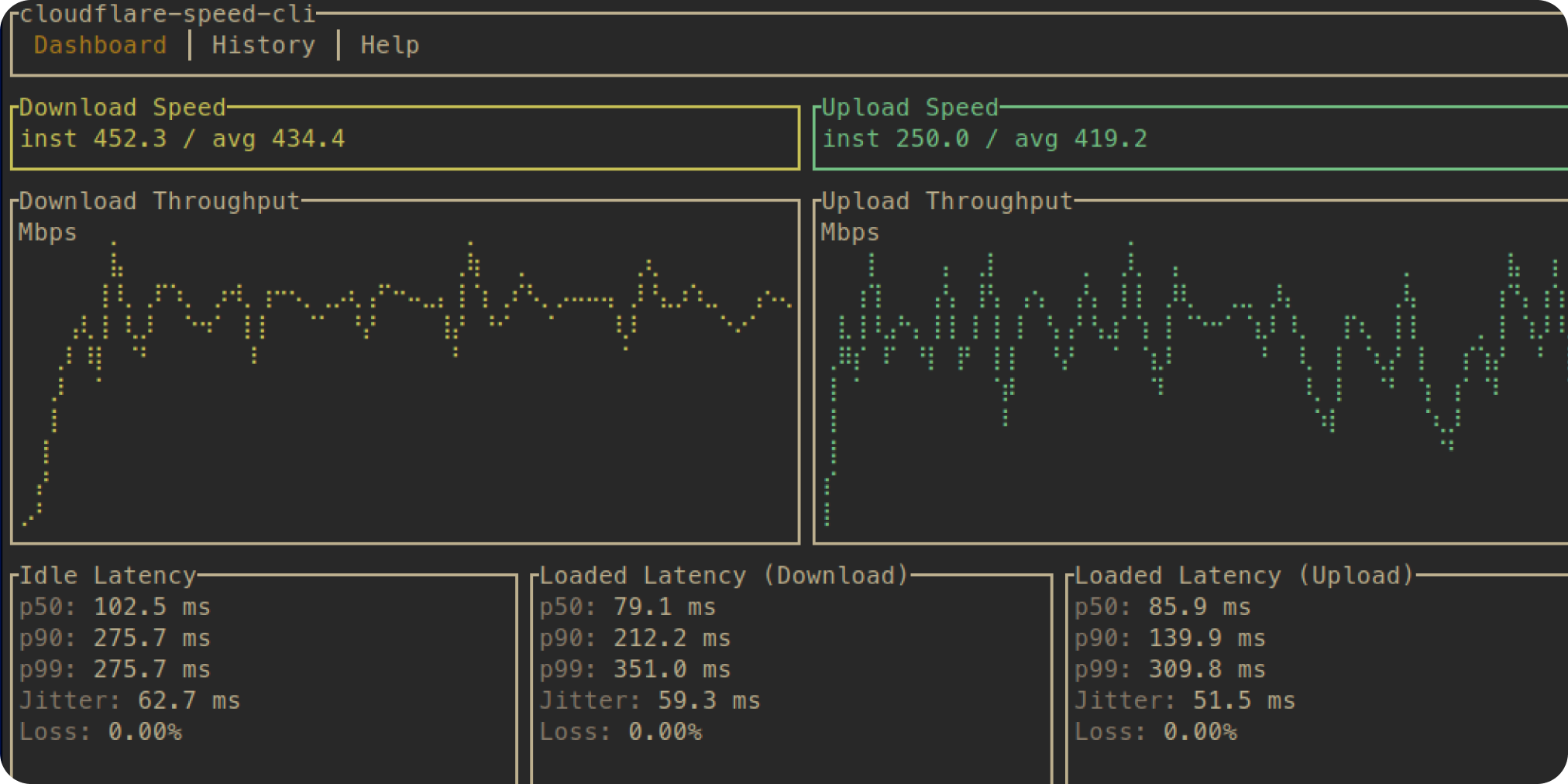
In today’s fast-paced digital world, optimizing your internet connection is crucial for seamless streaming, remote work, and cloud deployments. Enter the Cloudflare Speed Test CLI – a lightweight, open-source command-line tool designed to benchmark your network’s performance against Cloudflare’s global edge network. Developed by Kaveh Tehrani, this gem simplifies speed testing without the bloat of browser-based tools. Whether you’re a DevOps engineer, sysadmin, or just a tech enthusiast, this CLI will help you diagnose latency, throughput, and packet loss with precision.
If you’re into Linux productivity hacks, check out our guide on TuxMate: The Ultimate Linux Bulk App Installer for streamlining your setup even further.
Why Choose Cloudflare Speed Test CLI?
Traditional speed tests often overlook real-world factors like routing efficiency and edge proximity. The Cloudflare Speed Test CLI leverages Cloudflare’s 300+ data centers worldwide to deliver accurate, repeatable results. Key highlights include:
- Multi-Metric Testing: Measures download/upload speeds, latency, jitter, and packet loss in one run.
- Global Edge Focus: Tests against Cloudflare’s Anycast network for insights into CDN performance.
- CLI Simplicity: No GUI overhead – perfect for scripts, CI/CD pipelines, or terminal warriors.
- Cross-Platform: Works on Linux, macOS, and Windows via Go binaries.
This tool shines for troubleshooting VPNs, optimizing home labs, or validating ISP claims. It’s MIT-licensed, actively maintained, and clocks in at under 5MB – efficiency at its finest.
Quick Installation Guide
Getting started is a breeze. Prerequisites: Go 1.18+ installed.
- Via Go Install (Recommended):
go install github.com/kavehtehrani/cloudflare-speed-cli@latest- Binary Download: Grab pre-built releases from the GitHub repo and add to your PATH.
- Build from Source:
   git clone https://github.com/kavehtehrani/cloudflare-speed-cli.git
   cd cloudflare-speed-cli
   go build -o cf-speed .
Verify with cf-speed --version. Boom – you’re ready to test!
Hands-On Usage: Run Your First Cloudflare Speed Test
Fire up your terminal and unleash the power:
- Basic Speed Test:
cf-speedOutputs: Average download (Mbps), upload (Mbps), ping (ms), and more.
- Advanced Options:
- Specify duration:
cf-speed --duration 30s - Target a region:
cf-speed --edge-location syd(e.g., Sydney) - JSON output for scripting:
cf-speed --json > results.json
Sample output:
Download: 245.67 Mbps
Upload: 189.23 Mbps
Latency: 12.4 ms
Jitter: 1.2 ms
Packet Loss: 0.1%
Pro Tip: Integrate into cron jobs for ongoing monitoring. Pair it with tools like Prometheus for dashboard magic.
Final Thoughts: Elevate Your Network Game
The Cloudflare Speed Test CLI democratizes enterprise-grade diagnostics, making it easier than ever to fine-tune your connection. Download it today from GitHub and say goodbye to unreliable tests. Got a Linux workflow to supercharge? Dive into TuxMate next.
If you’re into Linux productivity hacks, check out our guide on TuxMate: The Ultimate Linux Bulk App Installer for streamlining your setup even further.
Why Choose Cloudflare Speed Test CLI?
Traditional speed tests often overlook real-world factors like routing efficiency and edge proximity. The Cloudflare Speed Test CLI leverages Cloudflare’s 300+ data centers worldwide to deliver accurate, repeatable results. Key highlights include:
- Multi-Metric Testing: Measures download/upload speeds, latency, jitter, and packet loss in one run.
- Global Edge Focus: Tests against Cloudflare’s Anycast network for insights into CDN performance.
- CLI Simplicity: No GUI overhead – perfect for scripts, CI/CD pipelines, or terminal warriors.
- Cross-Platform: Works on Linux, macOS, and Windows via Go binaries.
This tool shines for troubleshooting VPNs, optimizing home labs, or validating ISP claims. It’s MIT-licensed, actively maintained, and clocks in at under 5MB – efficiency at its finest.
Quick Installation Guide
Getting started is a breeze. Prerequisites: Go 1.18+ installed.
- Via Go Install (Recommended):
go install github.com/kavehtehrani/cloudflare-speed-cli@latest- Binary Download: Grab pre-built releases from the GitHub repo and add to your PATH.
- Build from Source:
   git clone https://github.com/kavehtehrani/cloudflare-speed-cli.git
   cd cloudflare-speed-cli
   go build -o cf-speed .
Verify with cf-speed --version. Boom – you’re ready to test!
Hands-On Usage: Run Your First Cloudflare Speed Test
Fire up your terminal and unleash the power:
- Basic Speed Test:
cf-speedOutputs: Average download (Mbps), upload (Mbps), ping (ms), and more.
- Advanced Options:
- Specify duration:
cf-speed --duration 30s - Target a region:
cf-speed --edge-location syd(e.g., Sydney) - JSON output for scripting:
cf-speed --json > results.json
Sample output:
Download: 245.67 Mbps
Upload: 189.23 Mbps
Latency: 12.4 ms
Jitter: 1.2 ms
Packet Loss: 0.1%
Pro Tip: Integrate into cron jobs for ongoing monitoring. Pair it with tools like Prometheus for dashboard magic.
Final Thoughts: Elevate Your Network Game
The Cloudflare Speed Test CLI democratizes enterprise-grade diagnostics, making it easier than ever to fine-tune your connection. Download it today from GitHub and say goodbye to unreliable tests. Got a Linux workflow to supercharge? Dive into TuxMate next.
